Contact us on 0800 GO EDIY for your Business Web Design and Internet Marketing requirements.

30-Day Free Trial!

Download! Business Web Design NZ and Website Hosting NZ support. Call 0800 463 349 Now!

"When I was first thinking about getting a website for my new business I did not want to spend a fortune in set-up costs. For only a fraction of the cost of other website companies I now have a professional looking website which is how I gain over 50% of new clients.
 
I have complete control over the website look and content. I love how I can make changes to the website whenever I like and these are instantaneous. No waiting around for a web designer to make the changes for me. Fantastic!
 
The best part though is the excellent Google ranking, which helps potential customers find AHeadStart easily. When they view the website they are impressed with how easy it is to use and often comment that this is the reason they chose us over the competition. Thanks eDIY!"

Melanie Coker 
AHeadStart Tuition

See what our clients are saying!

DIY Microphone Cable for iPod Touch (2nd Gen) for Skype VOIP, Audio Recording, Live Effects 

Option 1 - Y Splitter Adapter Mic/Headphone Converter Cable

Put together your own Y Splitter Adapter Mic/Speaker recording cable as shown in the circuit diagram below to use a PC Mic Headset with the iPod Touch (2nd Generation only) and iPhone.  
 
This works great with Skype software on the iPod Touch 2nd Gen so you essentially have a Wifi cellphone on your iPod, or for recording music or conversations.  You can also use this microphone cable with the iPhone, iPad or the later versions of the iPod Touch if you prefer to use a headset rather than the built in microphone for Skype.

The other benefit of this option is you can use a higher quality microphone with your iPod/iPhone than would be available with just a headset connection as described below, although people have reported impedance mismatch problems with some microphones.  We will try to find a solution to this issue and publish a more in depth circuit soon. 

The DIY iPod Touch Mic cable convertor wiring diagram:
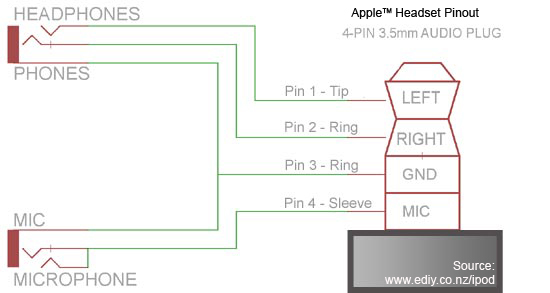
YSplitter-iPhone / iPod Touch Microphone PINout and Circuit Diagram

Here's a picture of the adapter cable described above - you can use shorter lengths and shielded audio cable for better and neater cabling.  Remember to put the caps on the wire before soldering the cables to the plug and sockets.
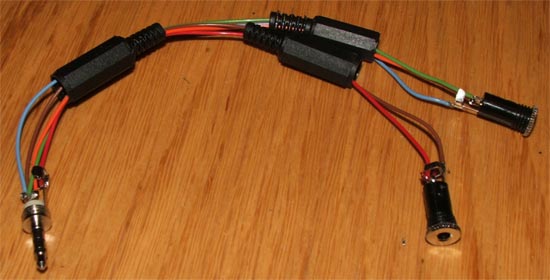
 iPod Touch Microphone Cable

Option 2 - Direct Microphone Headset Cable ConversionHow to Make iPhone App

You can also use the same connections as above with a PC headset that has had it's two standard plugs cut off.

Wire the headphone into the pins 1-3 of the plug and connect the microphone wires to pin 3 and 4.  This way you won't need to buy the two stereo 3.5mm sockets and the cable will end in a neater connection.

Please put up a link to this DIY iPod Mic Cable page if you found the information useful
http://www.ediy.co.nz/ipod-touch-iphone-mic-cable-xidc55676.html


iPod Touch, iPhone and iPad are trademarks of Apple Inc.  This article is for educational purposes only and we will not be held responsible should anything happen to your device.  This recording cable has been successfully tested on an iPod Touch but depending on your soldering skills it may be better and easier to buy a cable off the shelf. Web Design for this page was done with the eDIY Website Builder.