DIY Microphone Cable for iPod Touch (2nd Gen) for Skype VOIP, Audio Recording, Live EffectsOption 1 - Y Splitter Adapter Mic/Headphone Converter Cable
Put together your own Y Splitter Adapter Mic/Speaker recording cable as shown in the circuit diagram below to use a PC Mic Headset with the iPod Touch (2nd Generation only) and iPhone.
This works great with Skype software on the iPod Touch 2nd Gen so you essentially have a Wifi cellphone on your iPod, or for recording music or conversations. You can also use this microphone cable with the iPhone, iPad or the later versions of
the iPod Touch if you prefer to use a headset rather than the built in microphone for Skype.
The other benefit of this option is you can use a higher quality microphone with your iPod/iPhone than would be available with just a headset connection as described below, although people have reported impedance mismatch problems with some microphones. We will try to find a solution to this issue and publish a more in depth circuit soon. The DIY iPod Touch Mic cable convertor wiring diagram: 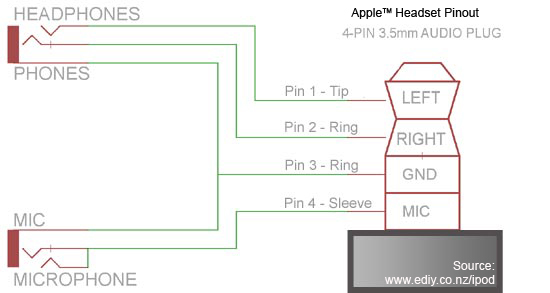
Here's a picture of the adapter cable described above - you can use shorter lengths and shielded audio cable for better and neater cabling. Remember to put the caps on the wire before soldering the cables to the plug and sockets. 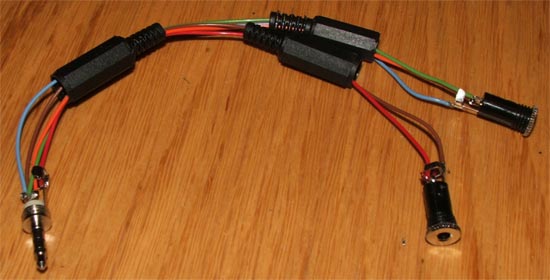
Option 2 - Direct Microphone Headset Cable Conversion
|